

Your existing manuals. Restructured. Standards-compliant.
Upload your existing operating instructions into DokuTech.app – our AI analyzes the structure, suggests standards-compliant chapters and actively supports you in migrating to the new EU Machinery Regulation (EU) 2023/1230. You retain full control at all times.
The challenge: modernizing existing manuals
Many companies face the same problem: operating manuals that have grown over the years in Word or PDF, which do not meet current standards. Manual restructuring is time-consuming, error-prone and expensive.
The solution: AI-assisted migration with DokuTech.app
DokuTech.app offers a structured migration process where AI actively supports you – but you always have the final say. The AI analyzes your existing documents, recognizes chapter structures and suggests a standards-compliant organization according to EN ISO 20607.
How the migration works
In 6 steps from the old manual to standards-compliant documentation
Upload document
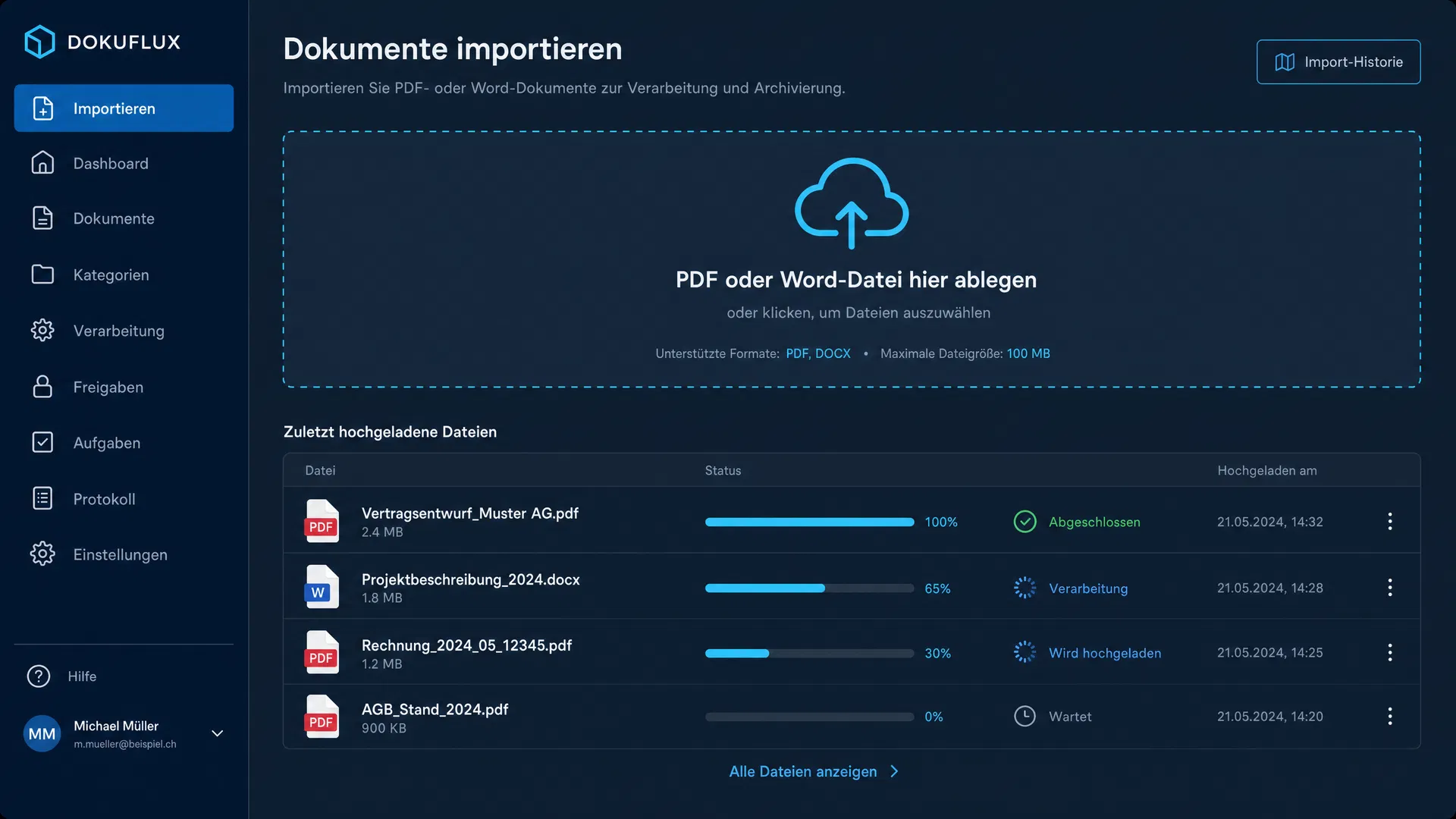
Upload your existing operating manual as a PDF or Word file to your protected company space. Your data remains exclusively in your company space.
AI structure analysis
The AI analyzes your document and identifies existing chapters, sections and content types. It identifies safety instructions, technical data, maintenance instructions and other elements.
Standards-compliant mapping
Based on the analysis, the AI suggests a mapping to the 92 standard chapters according to EN ISO 20607. You see exactly which content goes where – and where gaps remain.
Review and adapt content
You review each AI suggestion and adapt it to your needs. The AI makes suggestions – you decide. Company-specific formulations and technical terminology are preserved.
Complete missing chapters
For chapters missing from your current manual (e.g. risk assessment, intended use), the AI generates drafts based on your product information. You refine these drafts.
AI translation into 4 languages
After migration, translate your standards-compliant documentation with one click into up to 4 languages (DE, FR, IT, EN) – taking into account your glossary and terminology.
Before vs. After
What concretely improves through migration
| Aspect | Before (Word/PDF) | After (DokuTech.app) |
|---|---|---|
| Document structure | Grown structure, often inconsistent | 92 standard chapters per EN ISO 20607 |
| Safety instructions | Non-uniform format, sometimes missing | Standards-compliant and complete |
| Translations | Manual, expensive, error-prone | AI translation in 4 languages with glossary |
| Standards compliance | Unclear, hard to prove | Verifiable via 92 standard chapters |
| Updates | Laborious, version chaos | Centralized, versioned, traceable |
| EU Machinery Regulation | Not prepared | Ready for (EU) 2023/1230 |
What the AI does for you
Intelligent support at every step
Structure recognition
The AI recognizes chapters, headings and content types in your existing document and maps them to the 92 standard chapters.
Gap analysis
Missing mandatory chapters are identified and pre-filled with drafts you can customize.
Terminology preservation
Your company-specific technical terms and formulations are recognized and stored in the glossary.
Safety instruction review
Existing safety instructions are checked for standards compliance and improvements suggested if needed.
Translation support
After migration, all content is consistently translated into up to 4 languages – taking your glossary into account.
Formatting and layout
The AI adapts formatting to your corporate design and creates print-ready PDF exports.
You retain full control
The AI is a tool – not an autopilot. At every step of the migration, you can accept, reject or adapt suggestions.
Foreign-language manuals? Operator language is mandatory.
The EU Machinery Regulation (MR) 2023/1230 obliges importers and resellers to provide complete operating instructions in the operator's language. Non-compliance risks fines, recalls and liability claims. DokuTech solves this problem in just a few steps: upload your existing manual – whether in English, Chinese, Korean or any other language. Our AI analyses the document, automatically recognises images, tables and safety symbols, and creates standards-compliant operating instructions in German, French, Italian or English.
PDF scan for media library
Upload the English manual as PDF. The AI automatically scans the document for photos, images, illustrations and symbols and imports them into your media library.
Edit images
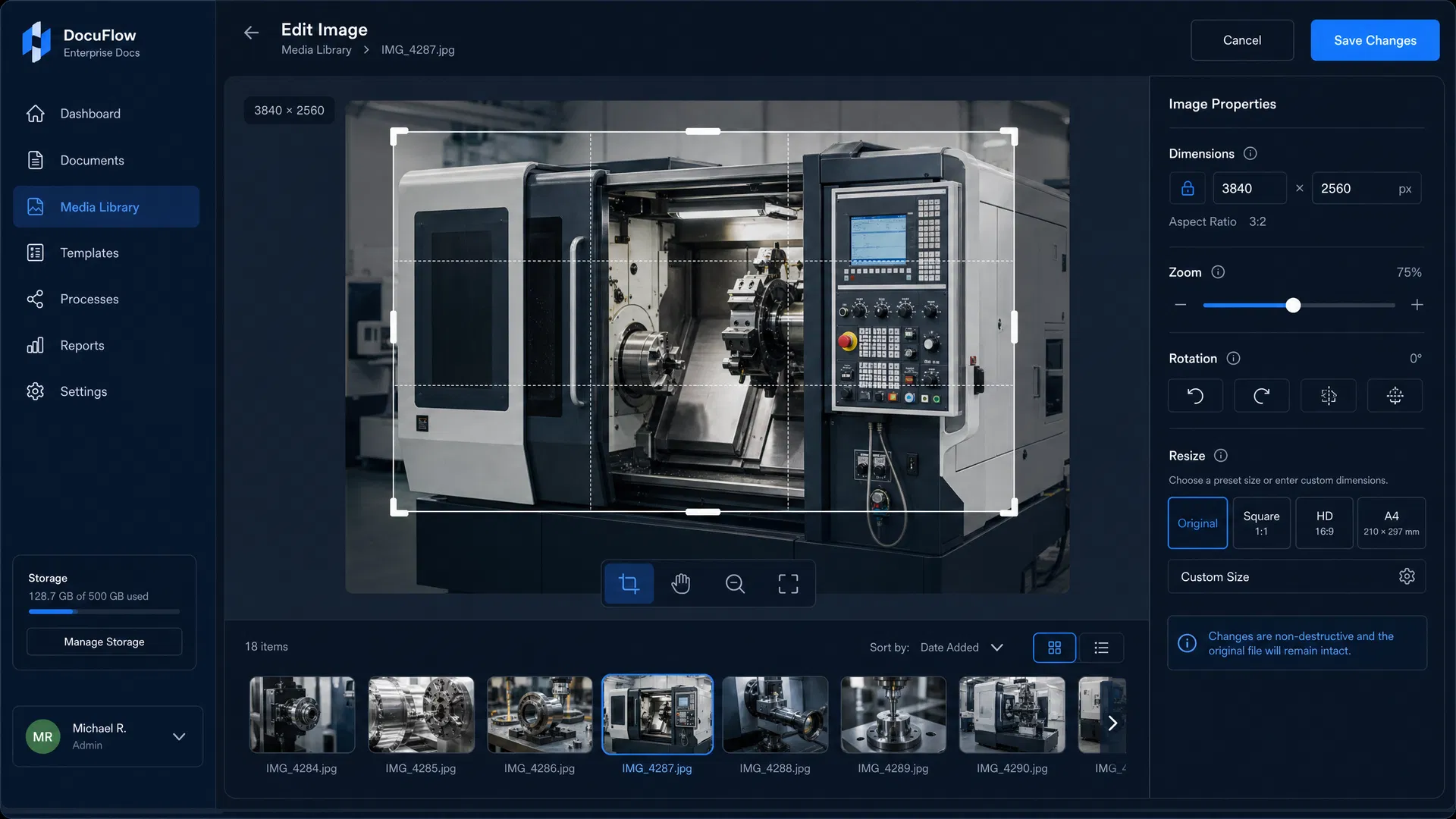
In the media library, you can crop, enlarge, reduce and optimize the imported images and symbols for your new instructions.
Prepare templates & text modules
Create your standards-compliant document structure with the 10 system templates and 537 chapters. The AI supports you in translating and mapping the English content.
Create operating instructions
In the Operating Instructions module, assemble everything: compliant structure, translated texts and imported media – your MR-compliant instructions in DE, FR or IT are ready.
The result: professional, Machinery Regulation-compliant documentation – without manual retyping, without formatting issues. Including all images, tables and safety symbols.
Table Extraction from Images
Technical data sheets, specification tables and alarm lists – automatically recognised and translated
DokuTech recognises tables in imported images and converts them into editable HTML tables. The AI automatically identifies structure, columns, rows and content, then translates the table directly into your target language. Perfect for technical data sheets, specification tables and alarm lists from machine manuals.
Recognise table
Click the Table button on an imported image – the AI automatically recognises structure and content.
Translate & review
The table is translated into your language. Review and correct the result before saving.
Insert in editor
Via the 'Table from library' button, insert the table directly into your chapter – with visual preview and search function.
The complete workflow in detail
From foreign-language supplier documentation to standards-compliant operating instructions – step by step
PDF Import
Extract images from foreign-language manual
Upload the supplier manual as PDF. The intelligent import assistant automatically extracts all photos, technical drawings, symbols and sketches in three phases. White margins are removed via auto-crop.
Media Library
Organize images systematically
All imported images are automatically stored in a separate category. With hierarchical categories and filename prefixes, you maintain a clear overview.
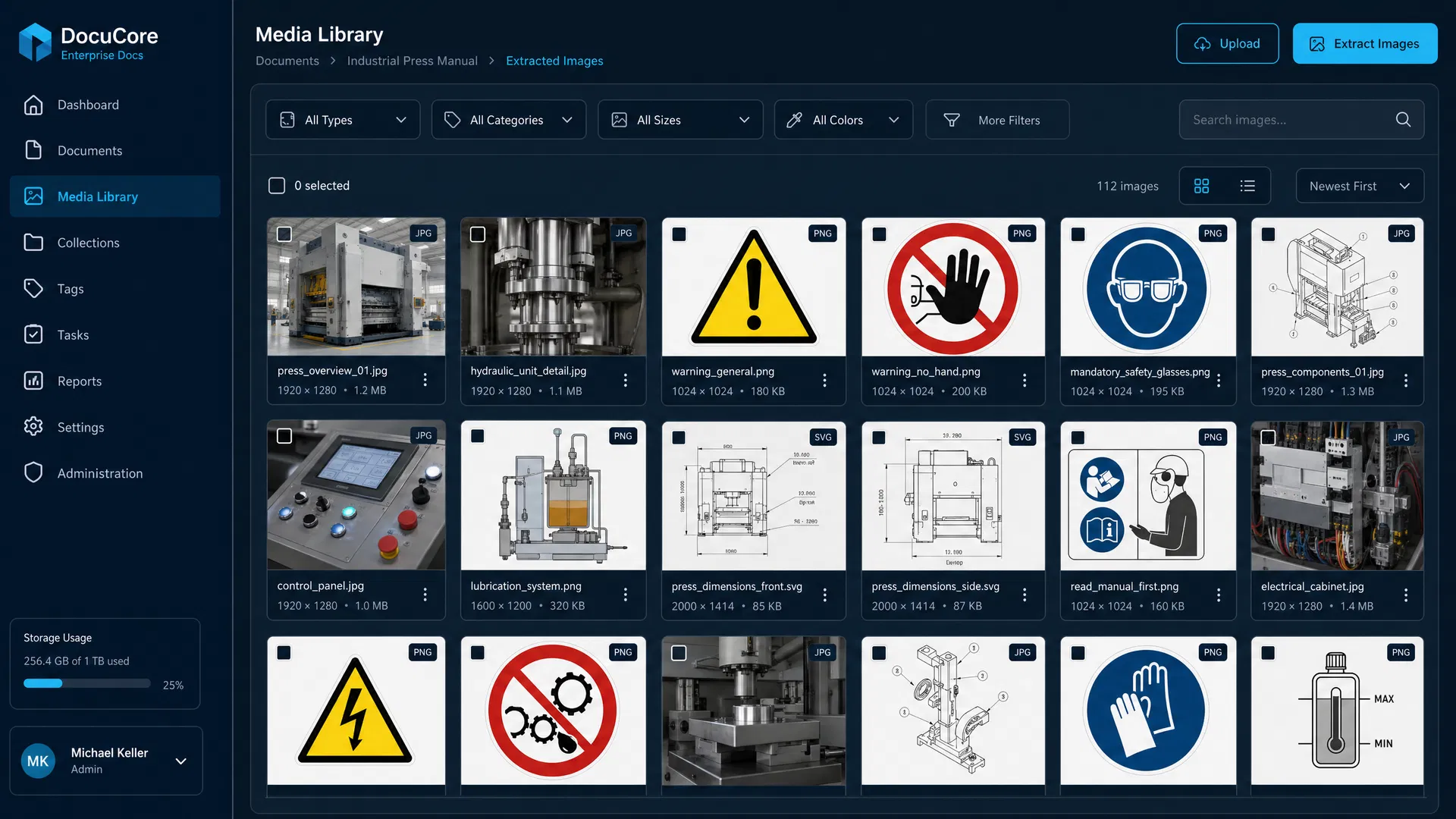
Image Editing
Crop, rotate, resize
The integrated image editing tool offers professional functions directly in the media library. Create multiple detailed excerpts from large overview plans – without losing the original.
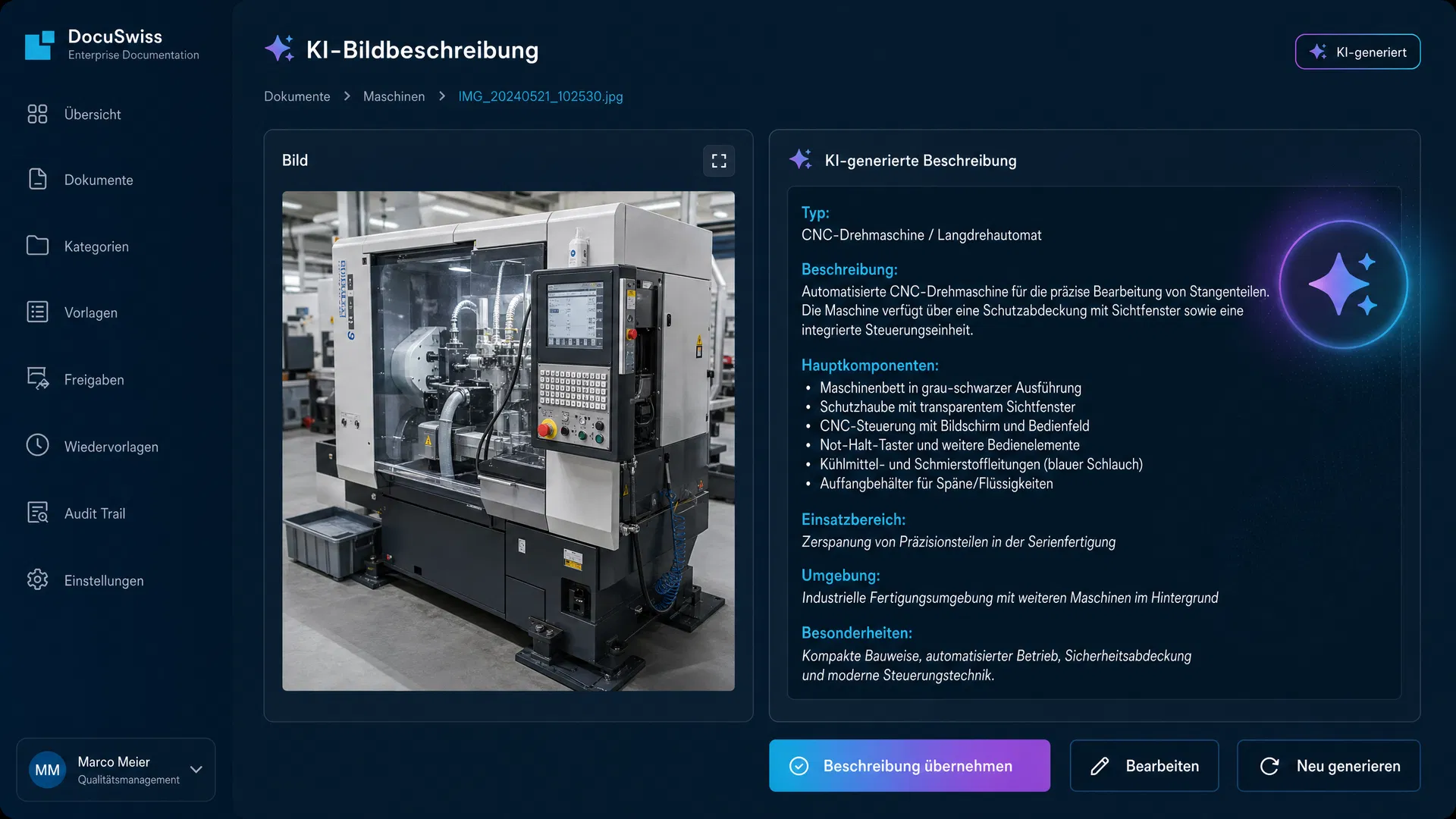
AI Image Description
Automatic analysis and description
The AI analyzes each imported image and automatically generates a description. It recognizes machine parts, safety symbols, technical drawings and control elements.
Templates & Text Modules
Build standards-compliant structure
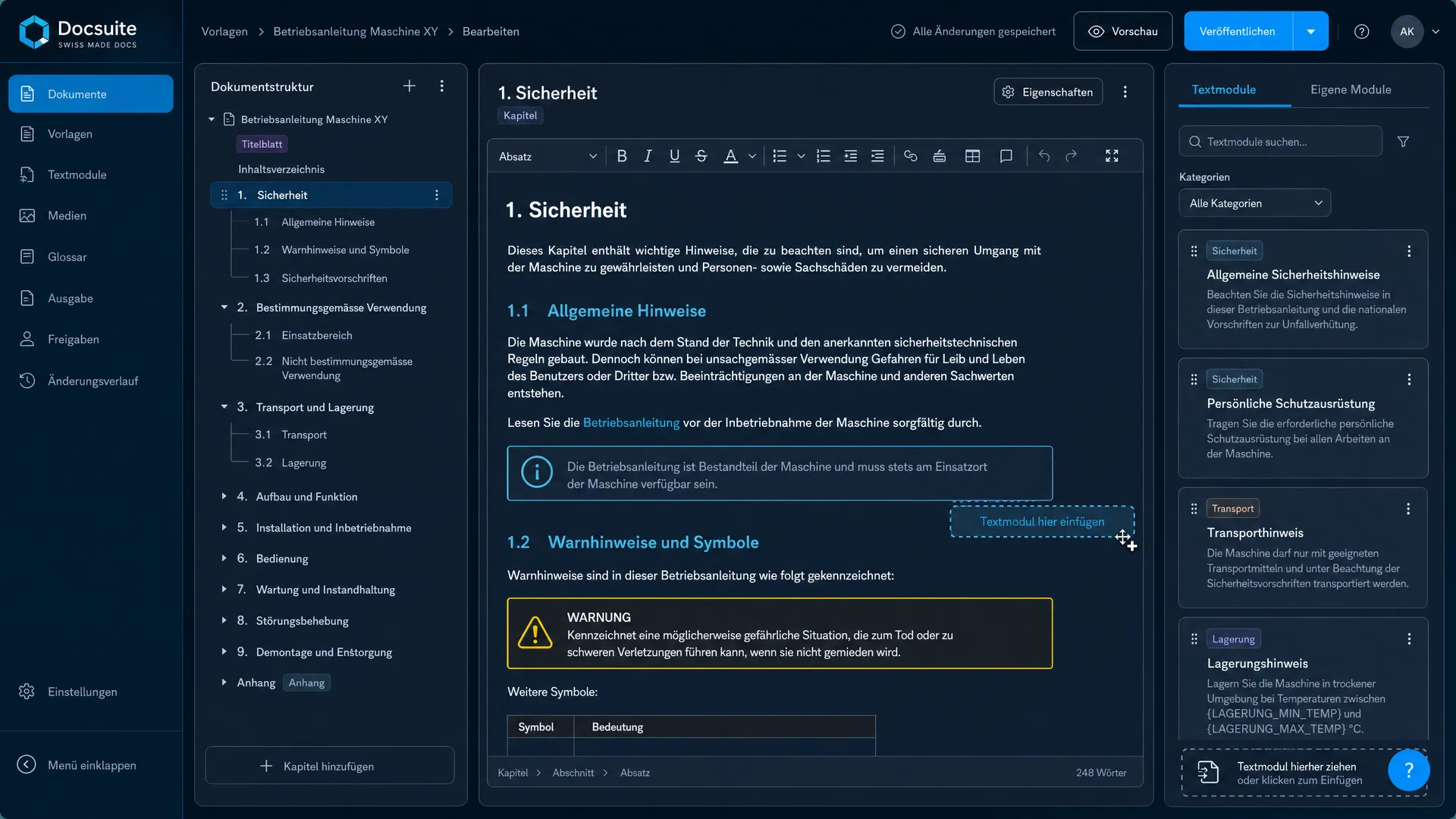
Use the predefined system templates according to EN ISO 20607 with 16 main chapters and over 70 sub-chapters. Each chapter contains an AI prompt as a guide. Text modules follow the CCMS principle: Single Source of Truth.
Operating Instructions
Assemble and customize chapters
In the Operating Instructions module, assemble your documentation. The CCMS principle with live references ensures that changes to templates are automatically propagated to all linked documents.

Machine Passport
Record technical data centrally
Register all machines in the central database with a unique machine passport ID. The passport is integrated as an independent section in the PDF documentation.

PDF & Delivery
Generate, freeze, deliver
Generate professional PDFs in DE/FR/IT/EN with cover page, table of contents and corporate design. Upon delivery, the state is frozen (snapshot) – for complete traceability per MR.

Data security & tenant separation
All data – images, texts, machine passport information and AI configurations – remain strictly within your company space. Complete data isolation between tenants. Hosting on Swiss servers, GDPR and DSG compliant.
See the workflow in action
In this short video, we show you how to create a standards-compliant operating manual in your language from an English supplier manual in just a few steps.
Demo video – Coming soon
approx. 3 minutes · Step-by-step guide
Data protection during migration
Your uploaded documents are processed exclusively in your protected company space. The AI analysis is carried out under the binding Data Processing Agreement (DPA) with OpenAI – your data is not stored, not used for training and is not accessible to third parties at any time.
Learn more about our data protectionFrequently asked questions about migration
Ready for migration?
Try DokuTech.app free for 30 days and migrate your first operating manual with AI support.
Data protection verified
- Strict tenant separation
- No AI training with your data
- Temporary AI processing
DokuTech.app